

AI didn’t become useful for me the day I discovered ChatGPT.
It became useful the day I stopped treating prompts like messages and started treating them like assets.
If you use AI occasionally, you can get away with ad-hoc prompting. If you use AI daily—for writing, strategy, analysis, ideation, or execution—your workflow eventually breaks.
This post is about how and why I built a prompt management system in Notion, how it fits into my real work, and why this approach has fundamentally improved the way I think, execute, and scale my output.
This is not a productivity trick. It’s an operating system.
The Problem Nobody Talks About: Prompt Chaos
Most people experience AI like this:
- Open ChatGPT
- Ask a question
- Get an answer
- Move on
That works—until AI becomes part of your daily work loop.
Here’s what started happening to me over time:
- I rewrote the same prompts again and again
- I remembered that I had a great prompt, but not where
- Prompts that worked well once produced inconsistent results later
- My output quality depended on how “clear” I was at that moment
- Context was constantly lost between conversations
In short: my thinking was scattered.
And scattered thinking leads to scattered execution.
Why Prompt Management Becomes Critical at Scale?
Once AI becomes a collaborator—not a novelty—you start using it across:
- Blog writing
- SEO analysis
- Strategy framing
- Social content
- Ads and scripts
- Internal thinking and clarification
- Decision-making support
At that point, prompts stop being inputs. They become leverage.
A good prompt can:
- Save hours
- Improve consistency
- Reduce mental load
- Standardize quality
- Help you think better, not just faster
But only if you can find, reuse, improve, and evolve it.
Why I Didn’t Use Docs, Notes, or Chat History
Before Notion, I tried:
- Google Docs
- Apple Notes
- ChatGPT conversation history
- Random Notion pages
All of them failed for the same reason:
They store text, not intent.I didn’t just need to save prompts. I needed to answer questions like:
- What is this prompt for?
- When should I use it?
- What kind of output does it generate?
- Which app does it work best with?
- Is this reusable or situational?
- Has this been refined over time?
That’s when it clicked:Prompts need structure, not storage.
Why I Chose Notion for This System
Notion worked because it allowed me to think in systems, not folders.
What I needed was:
- A database, not a document
- Tags, filters, and views
- The ability to evolve prompts over time
- A way to separate captured ideas from polished prompts
- One place to operate from
Notion gave me that flexibility without forcing a rigid workflow.
How My Prompt System Is Actually Structured
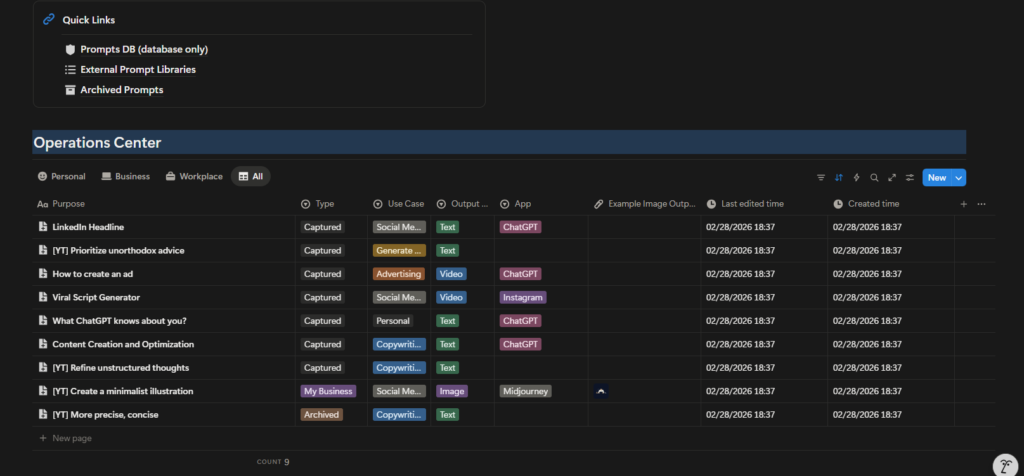
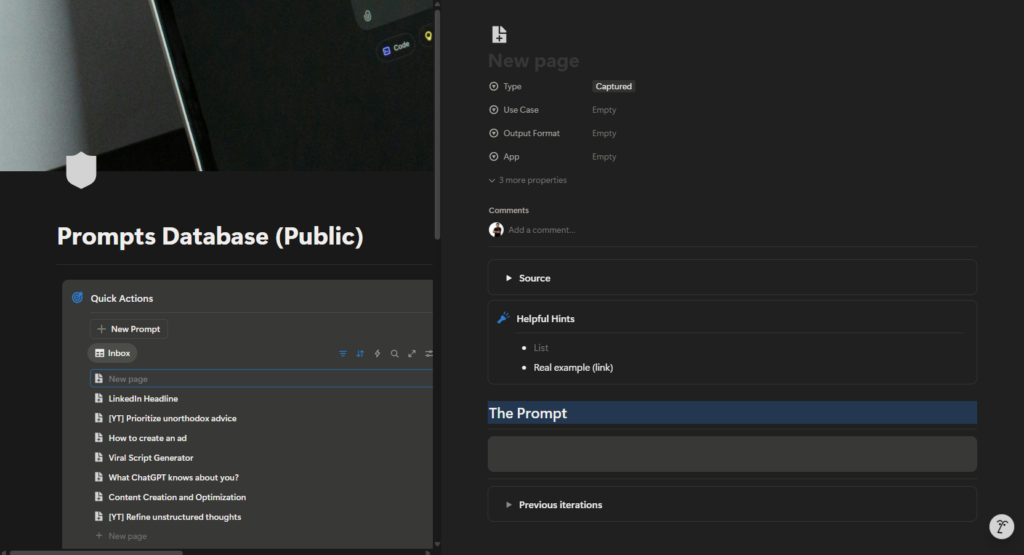
Let’s break down what you’re seeing in the screenshots—because this is not accidental design.
1. Prompts Database (Core Layer)
This is the foundation. Every prompt—no matter how raw—enters the system here.
Each prompt has structured fields such as:
- Purpose
- Type (Captured, Essentials, Archived, etc.)
- Use Case (Content, SEO, Advertising, Personal, etc.)
- Output Type (Text, Video, Image)
- App Used (ChatGPT, Instagram, Midjourney, etc.)
- Status
- Created Time
- Last Edited Time
This turns prompts into queryable assets, not notes.
2. Quick Actions (Capture Layer)
This is where speed matters. When a prompt idea hits me, I don’t want friction.
So I use:
- “New Prompt”
- Inbox-style capture
- Zero formatting at first
This mirrors how ideas actually appear—unstructured and messy. Clarity comes later.
3. Inbox vs Essentials (Thinking vs Doing)
One of the most important design decisions:
Not all prompts are equal.
- Inbox = raw, unpolished, experimental
- Essentials = refined, reliable, reusable
This separation alone improved my workflow dramatically.
It stopped me from:
- Reusing half-baked prompts
- Polluting my core workflow
Losing track of what actually works.
4. Pinned Prompts (Operational Layer)
Some prompts are always relevant.
Examples:
- Viral script frameworks
- Headline generators
- Thought refinement prompts
- Ad ideation structures
These are pinned because they are part of my daily operating system. I don’t search for them. They are always visible.
How This System Streamlines My Real Work
Let’s talk about actual use cases.
Example 1: Writing a Long-Form Blog (Like This One)
Before:
- Staring at a blank page
- Asking vague AI questions
- Rewriting instructions multiple times
Now:
- I pull a long-form structuring prompt
- Then a refinement prompt
- Then a tone calibration prompt
Each step is intentional.
The result:
- Faster writing
- Clearer thinking
- Consistent voice
AI becomes a collaborator, not a crutch.
Example 2: Social Content & Scripts
For short-form content:
- I use prompts designed specifically for platform context
- Output type is clearly defined (video/text)
- App is specified (Instagram, ChatGPT)
This avoids generic output.
The AI knows:
- Where the content will live
- What format it needs
- What constraints apply
That’s the difference between usable output and noise.
Example 3: Strategy & Thinking Clarity
Some of my most valuable prompts are not for content.
They are for:
- Refining unstructured thoughts
- Challenging assumptions
- Prioritizing ideas
- Clarifying decisions
These prompts don’t “generate content”.
They help me think better.
What Makes a Prompt Actually Good (In Practice)
A good prompt is not long. It’s clear.
From experience, good prompts usually include:
- Role definition
- Clear objective
- Constraints
- Output format
- Context
But more importantly:
A good prompt survives reuse. If a prompt works only once, it’s not a system—it’s luck.
Why I Version and Improve Prompts Over Time
Prompts evolve.
As my thinking improves, my prompts improve.
That’s why:
- I don’t overwrite prompts blindly
- I refine them based on output quality
- I archive what no longer works
This is exactly how:
- Code evolves
- Frameworks evolve
- Systems evolve
Prompts are no different.
Using This System Beyond Personal Productivity
This system works even better for teams.
Because it allows:
- Consistency across people
- Shared understanding of output quality
- Reduced dependency on “who is good at AI”
Instead of: “Ask X, they know how to prompt”
You get: “Use this prompt for this outcome”
That’s scalable.
What I’ve Added (and Will Continue to Add)
This system is not static.
Over time, I’ve added:
- Better categorization
- Clearer output tagging
- App-specific prompts
- Archive logic
And I’ll continue to evolve it as:
- AI tools change
- Workflows change
- Use cases expand
That’s the point.
Who This Prompt System Is For
This system is ideal if you:
- Use AI daily
- Care about output quality
- Do knowledge work
- Want repeatability
- Think in systems
It may be overkill if:
- You use AI occasionally
- You only ask casual questions
- You don’t reuse workflows
And that’s fine. Not every tool is for everyone.
Accessing the Notion Template
I’ve made this prompt system available as a Notion template.
You can:
- Copy it
- Customize it
- Strip it down
- Expand it
It’s not meant to be followed blindly. It’s meant to be adapted.
Final Thoughts: Prompts Are Leverage
AI didn’t make work easier.
It made thinking quality more visible.
Bad thinking produces bad output—faster.
Good systems produce good output—consistently.
Managing prompts in Notion helped me:
- Reduce friction
- Improve clarity
- Scale output
- Think better
And that’s ultimately the goal. Not productivity for the sake of speed.
But leverage that compounds.
